Ask Mary about your documents
Last updated: September 24, 2026
Ask Mary helps you investigate an issue, summarise a document or compare accounts. Answers include source references so you can check the supporting material.
Ask a question
Open your matter and make sure the relevant documents have finished processing in Sources. Find and review source documents explains where to look.
Open Mary tools → Fact explorer. This control opens Ask Mary.
Enter your question. Start with the issue you want to understand.
Answer any clarification questions and check a proposed plan if Mary presents one.
For example:
What does Complaint.pdf say about in-app payments?
Add detail when you need a narrower answer:
Summarise Epic's allegations about in-app payment restrictions in Complaint.pdf. Cite the relevant passages and separate the relief sought from the factual allegations.
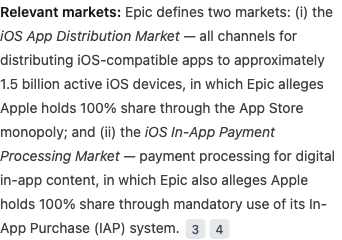
The answer attributes the allegations to Epic. Select a numbered reference to check the source.
Name the relevant files, people or period when the matter contains similar documents or several issues. For events in a separate table, use Create and edit a chronology.
Check the answer
Select a numbered citation to open its source. Read the surrounding passage and compare its author, date and wording with the answer.
A pleading records a party's position; a message may record an event or proposal; a later statement may describe a recollection. Keep those distinctions when using the answer. For example, summarising Epic's allegation does not establish that the allegation is true.
Ask a follow-up
Continue with the point you want to explore. If both parties' documents are available, you could ask:
How does Apple's response differ on that point?
Name the response document or passage if needed. To change an existing chronology or draft, open that work and edit it inline; see chronology editing or drafting.
If Mary cannot answer
For a Not able to answer response, check that the intended document has finished processing, open it to confirm the passage is readable, and make the filename or issue more specific in your question. The response alone does not mean the information is absent from your documents.
If the problem continues, contact Mary support with the question, matter reference and source page.
Find the conversation again
Open Chats and select the conversation by title. If it contains a completed work card, use Open in workspace to open that result. Find and export your work covers returning to saved work and downloading it.
For practice examples, see family law, personal injury and commercial litigation.