Uploading New File Types, Larger Batches and Import from Cloud Storage
Last updated: September 21, 2026
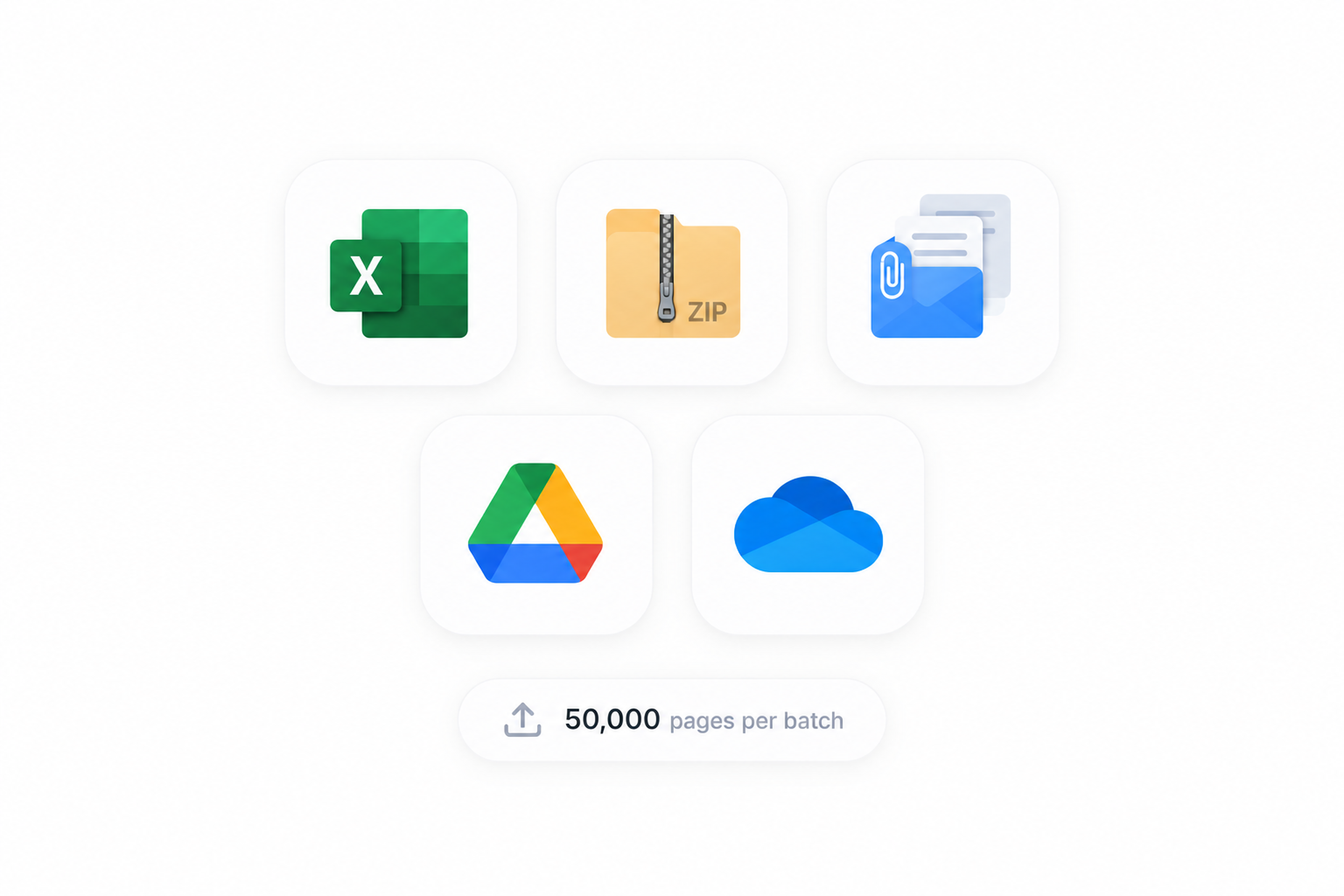
Mary’s new upload experience makes it easier to bring complete matter files into the platform while preserving their original structure and relationships.
You can now upload spreadsheets and ZIP archives, retain email threads and their attachments, upload larger batches, and import files directly from Google Drive or OneDrive.
What’s new
The new upload experience includes:
Support for spreadsheets and ZIP archives
Improved handling of email threads and attachments
Preservation of original folder paths and ZIP structures
Uploads of up to 50,000 pages per batch
Imports from Google Drive and OneDrive
Clear reasoning when files are rejected
Improved duplicate detection
Native side-by-side document viewing in newly created matters
Supported file types
Mary supports the following formats:
Documents: PDF, DOC and DOCX
Spreadsheets: XLSX
Emails: EML and MSG
Archives: ZIP
Images: PNG, JPEG, BMP and WebP
The older XLS spreadsheet format is not currently supported. Convert these files to XLSX before uploading them.
Uploading files and folders
To upload from your computer:
Open a matter and select + Add files.
Drag files or folders into the upload area, or select them from your computer.
Review the files Mary has detected.
Resolve any warnings or rejected files shown in the Needs Attention tab.
Select Process when you are ready to add the files to the matter.
You can navigate away from the matter while an upload is in progress.
Credits are only deducted once pages have been fully processed - when you select Finish & Generate while creating a matter, or Process when adding documents to an existing matter.
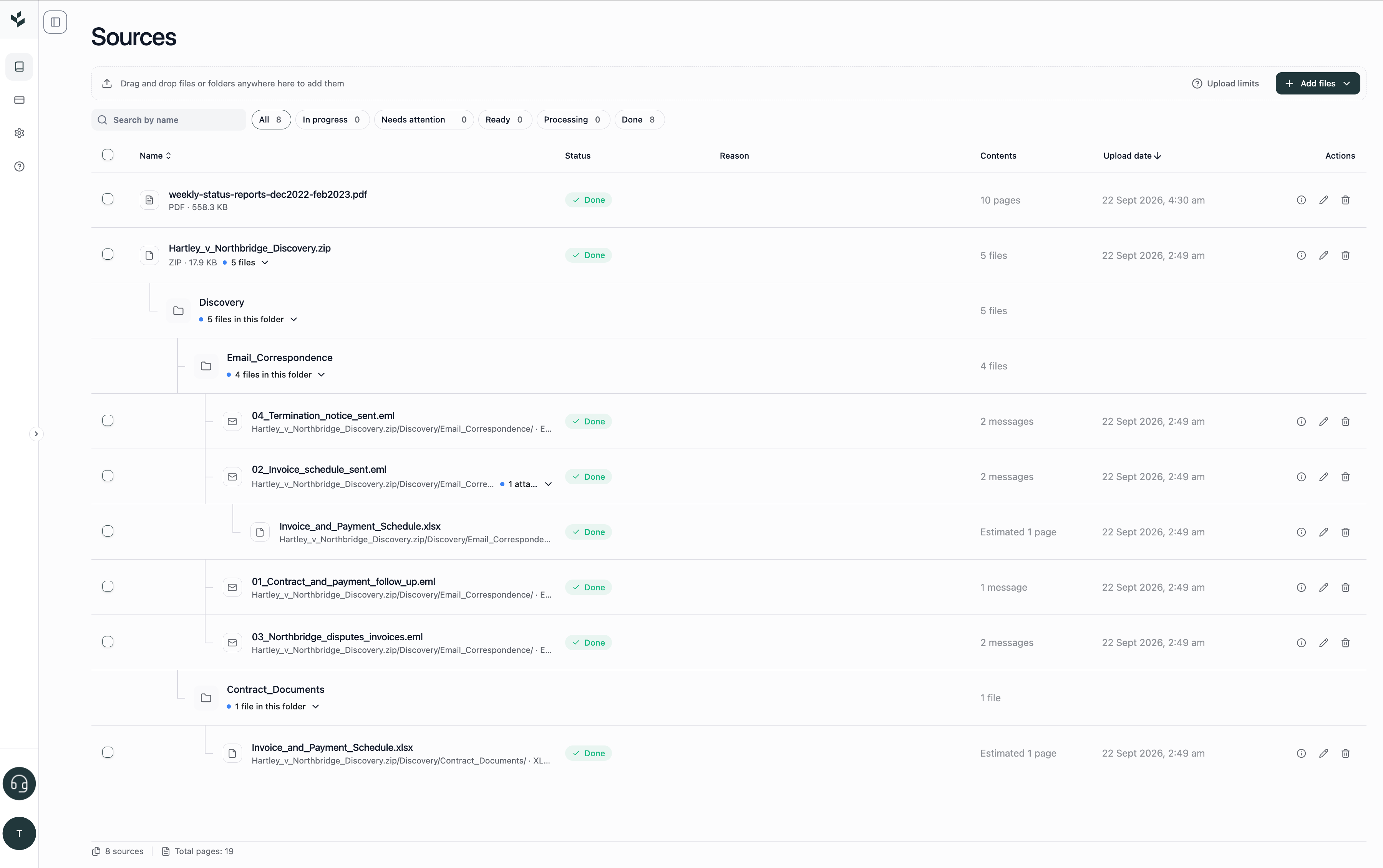
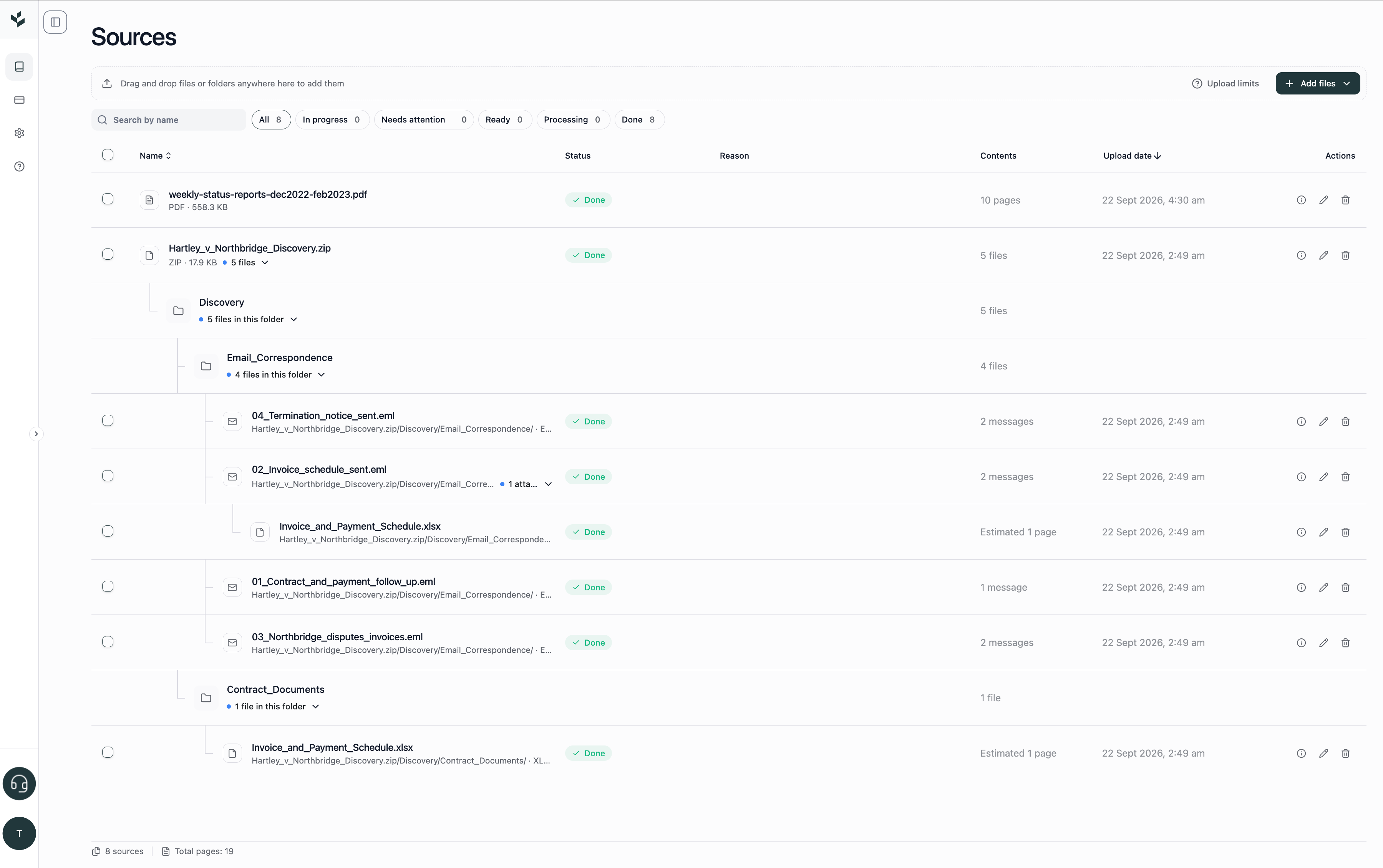
Uploading ZIP archives
ZIP archives can be uploaded directly without being extracted first.
Mary preserves the archive’s internal folder hierarchy so that you can understand where each file originally appeared. Files contained inside the archive are individually identified and processed according to their file type.
For example, a single ZIP archive may contain:
spreadsheets;
emails and their attachments;
Word documents;
PDFs;
images; and
nested folders.
The original structure remains visible after upload, helping you retain the context in which the documents were received or organised.
Uploading emails and attachments
Mary preserves the relationship between supported emails, email threads and their attachments.
This means you can review:
the email content;
earlier messages in the thread;
files attached to the email; and
the relationship between each email and its attachments.
Supported email formats are EML and MSG.
Uploading spreadsheets
You can upload XLSX spreadsheets alongside the other documents in your matter.
At the upload stage, Mary estimates the spreadsheet’s page count by converting its content into an approximate page equivalent. The final number of pages may therefore differ from the number of visible spreadsheet tabs or printed sheets.
Importing from Google Drive or OneDrive
Where cloud imports are enabled for your organisation, you can add files directly from:
Google Drive
Microsoft OneDrive
To import cloud files:
Open the matter and select + Add files.
Choose Google Drive or OneDrive as the upload source.
Sign in or authorise access if prompted.
Select the files you want to import.
Review the selected files and begin processing.
Availability depends on the integrations enabled for your organisation.
Upload capacity
The new upload experience supports:
Up to 5,000 files in one upload batch
Up to 50,000 pages in one processing batch
Up to 10,000 pages in an individual file
Files up to 500 MB each
ZIP archives up to 2 GB
Up to 5 GB of files awaiting upload at one time
If your documents exceed these limits, divide them into smaller batches before uploading.
Managing an upload
While files are being uploaded, you can:
pause or resume the upload;
cancel an upload;
retry a failed file;
remove and re-add a file;
rename a file; or
delete a file from the pending upload.
If an upload is interrupted by a temporary connection issue, Mary will attempt to resume it rather than requiring you to begin again.
Skipped, rejected and duplicate files
Mary validates a file’s actual format rather than relying only on its filename extension.
If a file cannot be processed, the upload interface will explain why it was rejected or skipped. Common reasons may include:
an unsupported file type;
an invalid or damaged file;
a file exceeding an upload limit; or
a duplicate file.
Duplicate detection considers both the filename and its folder location. This allows files with the same name to be retained when they come from different locations in the original folder or ZIP structure.
Viewing documents in Mary
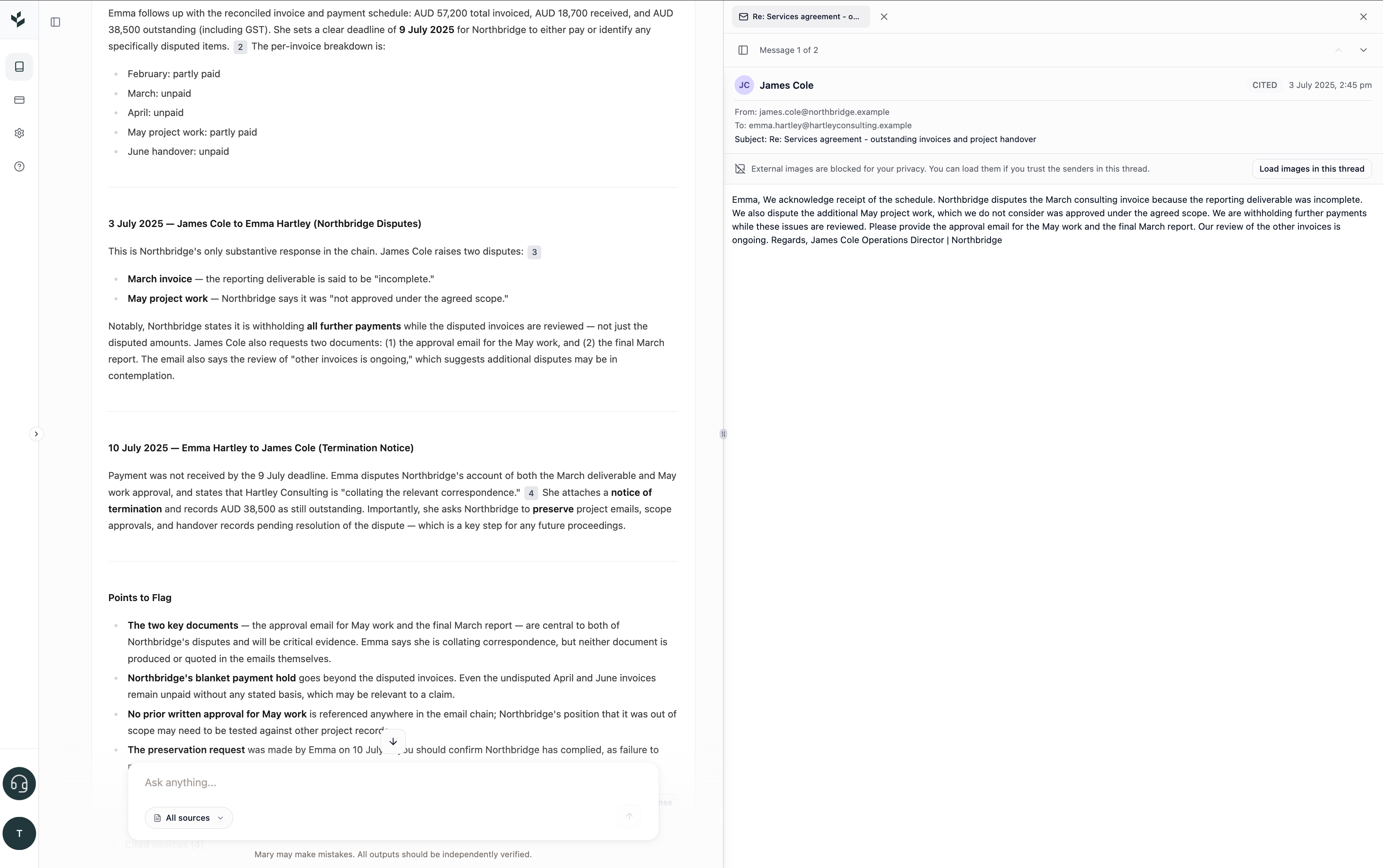
For newly created matters, supported documents can be opened in Mary’s side-by-side viewer in their native document format.
This makes it easier to review spreadsheets, complete email threads and their attachments, and Word documents with tracked changes and comments, all alongside Mary’s outputs and citations.
Documents in older matters will continue to use the existing PDF-based viewer. However, the new upload interface, supported file types and increased upload limits remain available when adding documents to existing matters.
Tips and best practices
Upload ZIP archives directly if preserving their internal structure is important.
Keep emails in EML or MSG format to preserve email and attachment relationships.
Convert older XLS spreadsheets to XLSX before uploading.
Review warnings before selecting Process.
Divide very large collections into batches of no more than 50,000 pages.
Check that your cloud-storage integration is enabled before attempting a Google Drive or OneDrive import.
FAQs
Can I upload an entire folder?
Yes. Mary preserves the original folder paths so you can retain the structure of the uploaded material.
Do I need to extract a ZIP archive first?
No. Upload the ZIP directly and Mary will identify its contents while preserving the internal hierarchy.
Will email attachments stay connected to their emails?
Yes. Mary preserves supported email threads and their attachment relationships.
Can I upload Excel files?
Yes. XLSX files are supported. The older XLS format is not currently supported.
Why does my spreadsheet show an estimated page count?
Spreadsheets do not have fixed pages in the same way as PDFs. Mary converts the spreadsheet into an approximate page equivalent for processing purposes.
Can I upload from Google Drive or OneDrive?
Yes, where the relevant integration has been enabled for your organisation.
What happens if my internet connection drops?
Uploads can resume following temporary network interruptions. You can also return to the matter and continue managing the upload.
Why was my file rejected?
Review the reason displayed next to the file. Mary may reject files that are unsupported, invalid, damaged or above the applicable limit.
Can I use these features in an existing matter?
The new upload experience, supported file types and increased limits are available when adding files to existing matters. Native-format document viewing is available in newly created matters.
Experiencing any issues?
If you experience any issues with Fact Explorer, please reach out via our in-app customer support chat.